
Do visitors leave your website before reading your content, viewing another page, or taking action? Do not worry, because many websites face this problem, and you can often improve it through a few focused changes.
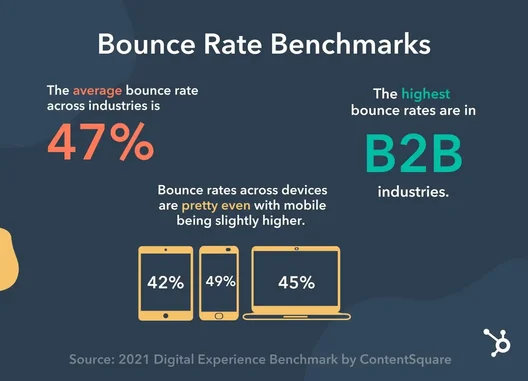
Bounce rate shows how often people leave a page without taking a meaningful next step. A high rate may point to slow loading, weak content, confusing navigation, or a mismatch between the page and the visitor’s needs.
This guide explains how to reduce website bounce rate by improving speed, content, design, usability, internal links, trust, and calls to action. You will also learn how to identify the pages that need attention first.
How to Reduce Website Bounce Rate
You should make every page useful, easy to understand, and simple to explore. The following methods can help visitors stay longer and interact with more of your website.
Here are the main ways to reduce website bounce rate:
- Improve Page Loading Speed
- Match Content With Search Intent
- Write a Strong Opening Section
- Make Content Easy to Read
- Improve Mobile Usability
- Simplify Website Navigation
- Add Useful Internal Links
- Use Clear Calls to Action
- Remove Intrusive Pop-Ups
- Improve Website Design
- Build Visitor Trust
- Fix Broken Links and Technical Errors
- Keep Content Accurate and Updated
- Review Page Performance Regularly
1. Improve Page Loading Speed
Visitors expect a web page to open quickly. A slow page can frustrate people before they even see your content. Large images, unnecessary scripts, heavy animations, and poor hosting often cause loading problems.
Compress your images and remove features that do not help the user. Test your most important pages on both mobile and desktop devices. A faster website creates a smoother first impression and encourages visitors to continue exploring.
Improve page speed by:
- Compressing large images
- Removing unnecessary plugins
- Reducing heavy scripts
- Using browser caching
- Choosing reliable hosting
- Avoiding automatic background videos
- Testing important pages regularly
2. Match Content With Search Intent
Search intent explains what a visitor wants when they enter a query. A person may want an answer, a comparison, a product, or a local service. Visitors often leave quickly when the page does not match that need.
Check the search results before you create or update your page. Review the types of pages that appear and notice the questions they answer. Then create content that gives the visitor the right information in a clear and direct way.
Match search intent by:
- Identifying the main purpose of the keyword
- Choosing the right page format
- Answering the main question early
- Removing unrelated sections
- Adding details that support the visitor’s goal
- Reviewing competing pages
- Updating content when search needs change
3. Write a Strong Opening Section
The opening section decides whether many visitors continue reading. A long or unclear introduction can make the page feel unhelpful. Start with the visitor’s problem and show that you understand it.
Explain what the page will cover and how it will help. Keep the first few paragraphs focused on the main subject. A strong introduction gives readers confidence that they have reached the right page.
A useful opening should:
- Start with a clear question or problem
- Reassure the reader
- Introduce the main topic
- Explain what the page covers
- Avoid unnecessary background details
- Include the main keyword naturally
- Give readers a reason to continue
4. Make Content Easy to Read
Large blocks of text can make useful information difficult to follow. Visitors often scan a page before deciding whether to read it fully. Short paragraphs and clear headings help them find the section they need.
Use simple words and explain technical terms when necessary. Add bullet points, numbered steps, bold phrases, and white space where they improve understanding. Readable content keeps attention and makes the page feel less tiring.
Improve readability with:
- Short paragraphs
- Clear sentences
- Descriptive headings
- Bullet points
- Numbered steps
- Bold text for key ideas
- Italic text for gentle emphasis
- Enough white space
5. Improve Mobile Usability
Many visitors open websites on mobile phones. A page that works well on a desktop may still cause problems on a smaller screen. Tiny text, crowded buttons, and wide images can push mobile users away.
Test every important page on different screen sizes. Make buttons easy to tap and keep text large enough to read without zooming. A simple mobile layout helps visitors move through the page without frustration.
Improve mobile usability by:
- Using readable text sizes
- Making buttons easy to tap
- Leaving space between links
- Keeping images within the screen
- Using a simple menu
- Removing unnecessary design elements
- Testing forms on mobile devices
6. Simplify Website Navigation
Clear navigation helps visitors understand where they are and where they can go next. A confusing menu can make people leave even when the website contains useful content. Keep the main options simple and easy to recognise.
Use familiar labels such as Services, About, Blog, and Contact. Avoid filling the menu with too many choices. Good navigation guides visitors toward helpful pages without making them think too hard.
Create better navigation by:
- Limiting the number of main menu items
- Using clear page names
- Adding a visible search option
- Including breadcrumbs on deeper pages
- Keeping the menu consistent
- Linking the logo to the homepage
- Making contact details easy to find
7. Add Useful Internal Links
Internal links guide visitors from one page on your website to another. They help readers find more information and encourage them to continue their journey. Without relevant links, a visitor may finish one section and leave.
Add internal links inside useful and related paragraphs. Use clear anchor text that explains what the next page covers. Do not add links only to increase their number because every link should help the reader.
Use internal links to:
- Connect related articles
- Guide readers toward service pages
- Introduce deeper guides
- Support important new pages
- Build clear topic groups
- Help visitors compare options
- Lead readers toward the next step
8. Use Clear Calls to Action
A call to action tells visitors what they should do next. Without clear guidance, readers may reach the end of a page and leave. The next step should match the page topic and the visitor’s level of interest.
Use direct phrases such as Read the guide, View the service, or Request a quote. Keep the action easy to understand and avoid adding too many competing buttons. One clear action often works better than several unclear choices.
Effective calls to action include:
- Read a related article.
- Download the checklist.
- View available services.
- Compare different plans.
- Join the email list.
- Request a quotation.
- Book a consultation.
- Contact the team.
9. Remove Intrusive Pop-Ups
Pop-ups can help collect leads, but aggressive pop-ups can interrupt the visitor. A large message that appears immediately may hide the content and create frustration. Mobile users often find these interruptions especially difficult to close.
Give visitors time to understand the page before showing an offer. Keep the close button visible and make the message easy to dismiss. Use pop-ups only when they provide real value.
Use pop-ups carefully by:
- Avoiding immediate full-screen messages
- Showing offers after meaningful engagement
- Adding a clear close button
- Keeping mobile pop-ups small
- Limiting repeated messages
- Matching the offer with the page topic
- Testing different timings
10. Improve Website Design
Website design affects how visitors judge a page within the first few seconds. A cluttered layout, poor colour contrast, or outdated design can reduce trust. A clean layout makes your content easier to understand.
Keep fonts, buttons, headings, and spacing consistent across the website. Place the most important information near the top of the page. Good design should guide attention rather than distract from the message.
Improve website design by:
- Using a clean page layout
- Choosing readable fonts
- Keeping colours consistent
- Adding enough white space
- Placing important content near the top
- Using clear buttons
- Removing distracting animations
- Keeping branding consistent
11. Build Visitor Trust
Visitors stay longer when they trust the website and the information it provides. Missing contact details, unsupported claims, and unclear business information can create doubt. Show people who created the content and why they can trust it.
Add author details, reliable sources, customer reviews, and clear business information where appropriate. Use secure website connections and explain your services honestly. Trust signals help visitors feel comfortable enough to explore or take action.
Useful trust signals include:
- Author names and biographies
- Professional experience
- Customer reviews
- Business contact details
- Clear policies
- Secure website connections
- Accurate sources
- Real project examples
12. Fix Broken Links and Technical Errors
Technical errors can stop visitors from reaching useful information. Broken links, missing pages, forms that fail, and buttons that do not work create frustration. People often leave when the website prevents them from completing a simple task.
Check important links and forms regularly. Redirect removed pages toward the closest relevant destination. Fix errors quickly so visitors can move through the website without interruption.
Check your website for:
- Broken internal links
- Missing pages
- Forms that do not submit
- Buttons that do not respond
- Incorrect redirects
- Images that fail to load
- Menu errors
- Pages that do not open on mobile
13. Keep Content Accurate and Updated
Old information can make visitors question the quality of your website. Outdated prices, broken references, unavailable services, and old screenshots can reduce trust. Review important pages on a sensible schedule.
Update details that affect the reader’s decision or understanding. Remove information that no longer applies and add new examples where they help. Fresh and accurate content gives visitors a reason to stay and return.
Update your content by:
- Checking facts and statistics
- Replacing broken links
- Updating prices and offers
- Adding recent examples
- Improving weak sections
- Removing outdated advice
- Reviewing search intent
- Updating screenshots when needed
14. Review Page Performance Regularly
You cannot improve bounce rate through guesses alone. Performance data helps you find the pages that attract visitors but fail to hold their attention. Review traffic, engagement, conversions, and page behaviour together.
Do not treat every high bounce rate as a serious problem. A visitor may leave after finding a complete answer, especially on a simple informational page. Judge each page according to its purpose and the actions you want visitors to take.
Review these performance areas:
- Pages with high traffic and weak engagement
- Average engagement time
- Internal link clicks
- Form submissions
- Product or service views
- Mobile performance
- Page loading speed
- Search intent
- Leads and conversions
Apply Lessons to Improve Visitor Engagement
Improving bounce rate requires more than changing one design element. Many professionals learn these practical strategies through structured training such as a GBOB course, where they understand user behaviour and website performance in detail.
- Study visitor intent: Make sure the page answers the question behind the search.
- Review the first screen: Show useful information before visitors need to scroll far.
- Remove unnecessary distractions: Keep attention on the main content and next action.
- Test important pages: Compare different titles, layouts, and calls to action.
- Guide visitors clearly: Use internal links and buttons to suggest the next useful step.
- Improve weak pages first: Focus on pages that receive traffic but produce few useful actions.
- Check mobile behaviour: Look for problems that only affect phone users.
- Match every action with the page: Use educational actions on guides and sales actions on service pages.
- Track business results: Measure leads, sales, and enquiries instead of bounce rate alone.
- Review changes carefully: Record updates so you can see which improvement produced a better result.
Common Mistakes That Increase Website Bounce Rate
Several avoidable issues can push visitors away before they interact with your website. Review these mistakes whenever you create or update an important page.
- Slow loading: Heavy pages make visitors leave before the content appears.
- Misleading titles: A title that does not match the page creates disappointment.
- Long introductions: Too much background delays the answer visitors want.
- Poor mobile design: Small text and crowded buttons frustrate mobile users.
- Weak navigation: Confusing menus make useful pages difficult to find.
- Large text blocks: Dense paragraphs reduce readability and attention.
- Too many pop-ups: Repeated interruptions make the website feel aggressive.
- Missing internal links: Visitors leave when they cannot find a useful next page.
- Unclear calls to action: Readers do not act when the next step feels confusing.
- Outdated information: Old details reduce trust in the full page.
- Broken links: Dead ends interrupt the user journey.
- Too many advertisements: Excessive ads distract visitors from the main content.
- Automatic audio or video: Unexpected media can annoy users and slow the page.
- Weak trust signals: Missing contact or author information can create doubt.
- Ignoring page purpose: A high bounce rate may not matter when the page fully answers a simple question.
Final Note
In this guide, we have covered how to reduce website bounce rate by improving page speed, search intent, introductions, readability, mobile usability, navigation, internal links, calls to action, design, trust, technical health, content accuracy, and performance tracking.
In my experience, websites often reduce bounce rate when they stop trying to impress visitors and start making every step easier. A fast page, a clear answer, and a useful next action can create a stronger result than a complicated design. You should also remember that a low bounce rate does not always guarantee success. Focus on meaningful actions, satisfied visitors, leads, and sales.
Keep your website simple, useful, and easy to explore, and review its performance regularly.
Good luck with your website improvements, and thank you for reading!